How/When to replace the dust bag of my Philips HomeRun vacuum cleaner robot?
Published on 20 May 2025
To find out when and how to replace the dust bag of your Philips HomeRun vacuum and mop robot models XU7100, XU2100, and XU3100, read our article below.
When to replace the dust bag
The Philips HomeRun vacuum and mop robot models XU7100 & XU3100 come equipped with the Auto-Empty station. After cleaning, the dust bin of the robot is emptied automatically in the disposable bag within the Auto-Empty station.
Depending on your home environment, cleaning frequency, and the number of pets, the disposable bag can last for up to 30 days before needing a replacement.
Note:
Depending on your home environment, cleaning frequency, and the number of pets, the disposable bag can last for up to 30 days before needing a replacement.
Note:
- In the Philips HomeRun App, you can specify your Auto-Empty preferences, like the frequency of emptying the dust bin. To do so, tap the main menu (3 horizontal bars) and select "Auto-empty settings".
- To order a new set of dust bags, tap the main menu (3 horizontal bars) and select “Find accessories”. You can also find them on our website, Replacement dust bags XV1472 for the XU7100 series and Replacement dust bags FC8022 for the XU3100 and XU2100 series.
How to replace the dust bag (XU7100)
The information below applies only to the 7100 model.
Watch our video below on how to replace the dust bag.
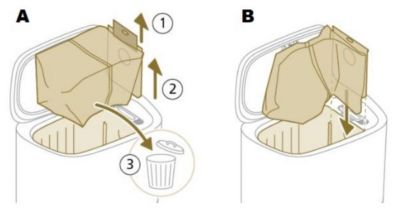
- Open the lid of the Auto-Empty station.
- Use the handle of the dust bag to pull the dust bag out of the Auto-Empty station and dispose of the dust bag (see image A).
- Put a new dust bag in the Auto-Empty station by sliding the cardboard piece into the slot that is shown on the station (see image B).
Watch our video below on how to replace the dust bag.
How to replace the dust bag (XU5100)
The information below applies to XU5100 models.
If the orange LED in the middle of the station flashes, it indicates that the dust bag is full, not placed, or not correctly placed.
- Open the lid of the station. (see image A)
- Press the release button and push the bag holder to the side. (see image B)
- Remove the dust bag. (see image C)
- Dispose of the used dust bag (see image D)
- Slide the cardboard piece of the new dust bag onto the bag holder. (see image E)
- Push the bag holder back to its standing position until you hear a clicking sound. (see image F)
- Close the lid of the station.
Note: The replacement dust bag model number is FC8022.
If the above solutions did not help solve the issue, contact us for further assistance.
How to replace the dust bag (XU3100, 3110, and 2100)
The information below applies to XU3100, XU3110 and XU2100 models.
When the orange LED on the auto-empty station flashes indicating that the dust bag is full:
- Open the lid of the Auto-Empty station (see image A).
- Press the release button and push the bag holder to the side. (see image B).
- Remove and dispose of the dust bag (see image C).
- Slide the cardboard piece of the dust bag onto the bag holder (see image D).
- Push the bag holder back to its standing position until you hear a clicking sound and close the lid of the Auto-Empty station(see image E).
Note: The replacement dust bag model number is FC8022.
Watch our video below on how to replace the dust bag.
If the above solutions did not help solve the issue, contact us for further assistance.
Play Pause

